Build a program
You can assign the same Cleanpull program to several athletes. They share the weeks, training days, exercises, and progression, but each athlete has their own target weights and starting week and day.
| Part | What you set |
|---|---|
| Program | Number of weeks, training days, exercises, and exercise order |
| Progression scheme | Weekly intensity, reps, and sets for a group of exercises |
| Exercise slot | Settings for one exercise on one day: scheme, weeks, coaching note, RPE, and how to calculate its weight |
| Assignment | One athlete’s starting week and day, target maxes, and hold times |
Create the program
Section titled “Create the program”- In Coach mode, open Programs.
- Choose New program, or choose a starter template.
- Name the program and set its duration.
- Set the number of training days per week.
- Define the progression schemes, then add exercises to each day.
- Preview the whole program and choose Save program.
A template is an editable starting point. Saving it creates a program in your workspace and does not alter the original template. The five templates are:
- Beginner Barbell for new lifters without a max. Athletes choose their own weight for every exercise, and the workout shows the weight they last logged for it.
- PHUL for intermediate powerbuilding: four days a week over twelve weeks.
- Tactical Operator for three-day strength alongside separately programmed conditioning.
- Olympic Starter for lifters already competent in the snatch and clean and jerk.
- Upper Body for experienced lifters specializing in upper-body work.
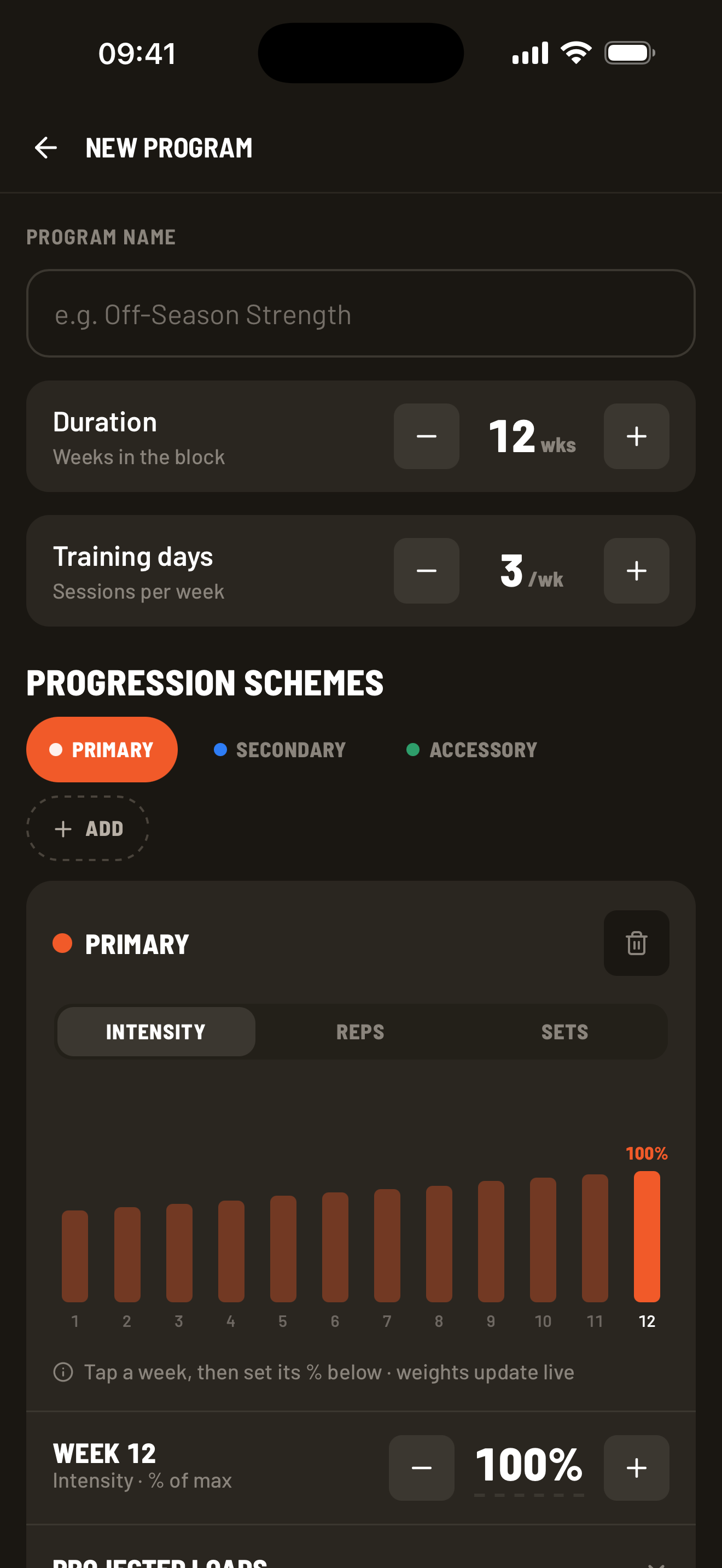
On the phone, the builder opens with a tip pointing you to cleanpull.app on a laptop or tablet, where the whole program fits on screen. Press × to dismiss it for good.
Set weekly progressions
Section titled “Set weekly progressions”A progression scheme sets how a group of exercises changes from week to week. For each week, you set:
- Intensity — a percentage used to calculate the weight or hold time.
- Reps — repetitions per working set for regular exercises.
- Sets — working sets in that workout.
Create schemes for exercise groups that should progress together. A simple strength program might use:
- Primary for the competition lifts: lower reps and heavier weights over time.
- Secondary for close variations: moderate volume and intensity.
- Accessory for smaller movements: steadier intensity and higher reps.
Name schemes to suit your program. You can also name them after phases, such as Base, Build, and Peak.
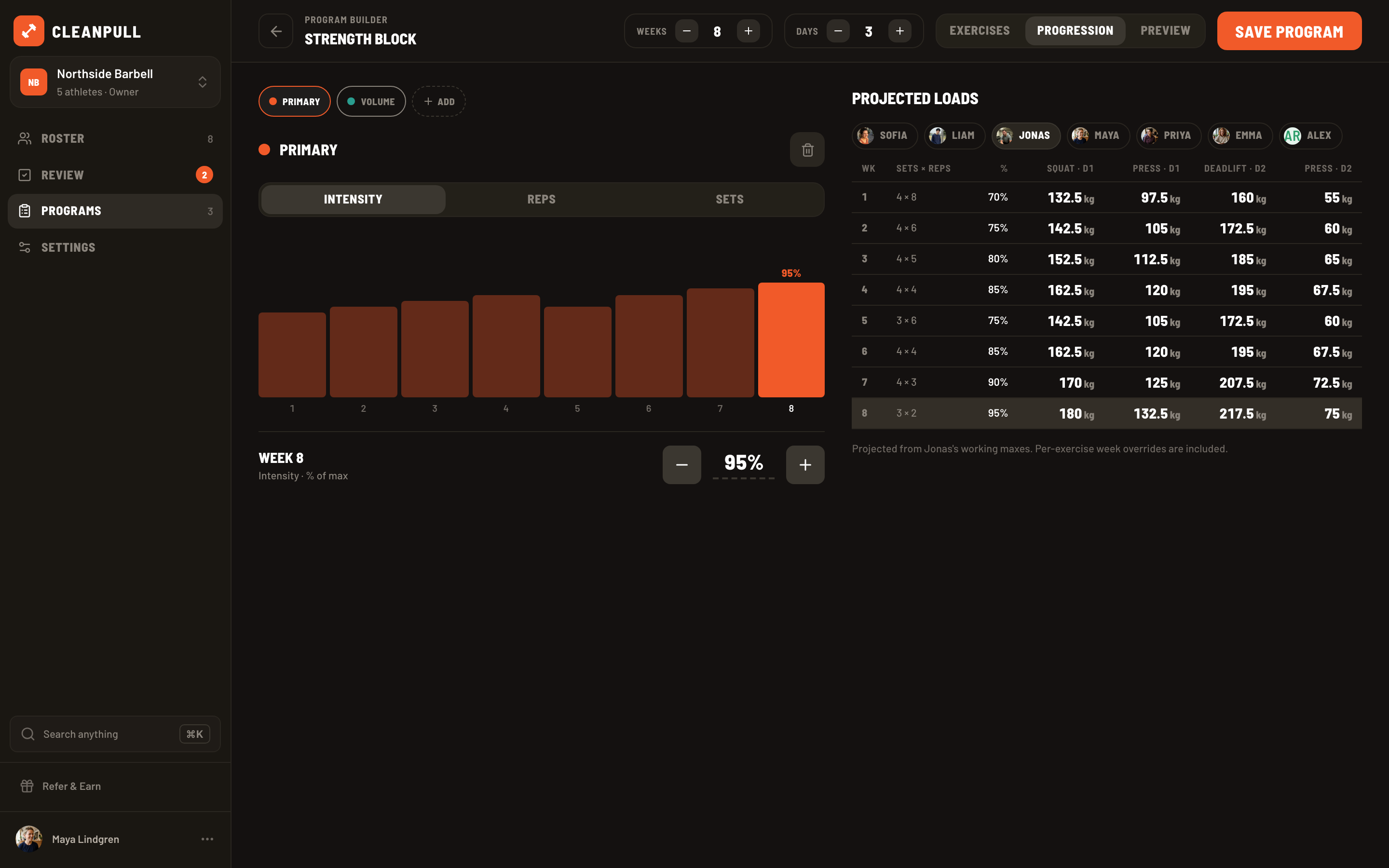
Select a scheme, switch between Intensity, Reps, and Sets, select a week, and adjust its value. Every exercise using that scheme follows those values. Changing the scheme updates them all, except where you have set a different value for an individual exercise.
A simple example
Section titled “A simple example”Suppose Primary uses 4 × 5 at 80% in week 3. Back Squat, Bench Press, and Deadlift can all use Primary, but each athlete’s load is calculated from their target for that exercise.
For an athlete with a 150 kg Back Squat target, week 3 prescribes 120 kg before load rounding. Another athlete can follow the same program with a 100 kg target and receive 80 kg. Both athletes still do 4 × 5 at 80%.
Start from a preset
Section titled “Start from a preset”To fill in a scheme quickly, start from a preset. Under the scheme name, pick one:
- Linear — weight goes up a little each week while reps come down. You can deload the last week.
- Undulating — light, medium and heavy weeks take turns, and each round gets a little heavier.
- Step — a few hard weeks, then a deload at half the sets, and each round starts a little heavier.
- Block — three phases in order: volume, then strength, then a peak.
- Double — reps go up each week until they reach the top of the range, then the weight goes up and reps start over. It suits accessory work.
- Constant — the same intensity, reps and sets every week. It starts at 0% and 1 × 1, so it also clears a scheme you want to fill in by hand.
Each preset starts with suggested values and shows them beside your current scheme for each week. Switch the preview between intensity, reps and sets to see each one change. Change any number and the preview updates. You set the total increase in weight for the program. The preset spreads that increase across the number of weeks you choose. If a week asks for more weight than most lifters can handle for its reps, the preview marks it as too heavy.
A preset covers every week unless you drag the Weeks handles to a shorter range. That lets you build a scheme in parts, like Block for weeks 1–8 and then Linear for weeks 9–12. Weeks outside the range keep what they have.
Apply replaces the intensity, reps and sets for the chosen weeks of that scheme. Custom values on single exercises stay as they are. If you change your mind, press Undo on the message that appears, or ⌘Z on the web.
Add exercises to each day
Section titled “Add exercises to each day”Open each day and add exercises from the library. Search understands common alternative names and shorthand, so “strict press”, “ohp”, and “db rdl” all find the right exercise. You can also enter a custom name. Each exercise card is called a slot. You can add the same exercise to several days or phases and give each slot different settings.
For each slot:
- Choose the progression scheme it follows. On the web, right-click a scheme label and choose Edit scheme to open its weekly values.
- Set Applies if it should run for only part of the program.
- Add a coaching note, RPE target, or superset link when useful.
- Choose which max or bodyweight to use when calculating its weight.
- Open Progression to change individual weeks for that exercise.
Combine exercises into a complex
Section titled “Combine exercises into a complex”A complex joins consecutive exercises into one set, such as a clean followed by a front squat. Put its parts next to each other on the same training day. On the phone, tap Complex on the second exercise to join it to the one above. On the web, select that exercise and turn on Complex under Options in the exercise panel. Repeat on later rows to add more parts; turn the same control off to unlink a part from the row above.
The first exercise determines the sets and weight; each part keeps its own reps. The athlete sees the names joined together and the reps as a chain, such as 1+2, and logs the whole complex once. This differs from a superset, where each exercise is logged separately. Timed holds cannot join a complex. Check the combined prescription in the preview before assigning it.
Rest between sets
Section titled “Rest between sets”You can set a rest time for the whole program, a training day, or an exercise. Cleanpull uses the exercise’s rest time first, then the day’s, then the program’s. If none is set, it uses the athlete’s own setting. Exercises in a superset share one rest time.
- On the phone: use the Rest card under Training days for the program, the Day N Rest row for a day, or the Rest button on an exercise.
- On the web: use the rest controls in the program header, day headers, or exercise panel.
Use −, +, or drag the number to set a rest time. Choose × to clear it. A grey number shows the rest time that applies when you have not set one here; a dash means none is set.
The timer only starts automatically if the athlete has auto-start turned on. If they use the adaptive rest timer, extending or shortening a rest changes later rests in that workout too. An active workout keeps the program rest settings it started with, even if you edit the program. Apple Watch uses the same rest time as the phone.
Write program notes
Section titled “Write program notes”Each program has a notes field for the coaching staff. Use it for the intent of the program, who it suits, what to watch for, or how you would adjust it next time. Athletes never see these notes. They are not part of the workout, the Program tab, or any notification.
- On the phone: the Program notes field sits under the Rest card at the top of the builder.
- On the web: choose the Notes tab beside Exercises, Progression, and Preview. The tab shows a dot while the notes have text.
Notes save with the program and come back when you reopen it. Undo and redo cover notes edits on the web. Duplicating a program copies its notes, and a template starts with none.
Check the muscles trained
Section titled “Check the muscles trained”Each training day has a muscle map showing which muscles it works. The front and back diagrams show how much work each muscle gets across the program. The weekly table counts one set for a main muscle and half a set for a supporting muscle.
On the phone, tap Muscles beside the day tabs. On the web, choose Muscle map in a day header. You can switch days and choose the male or female diagram. Custom exercises are listed below the table and are not included in the counts.
Preview and edit the program
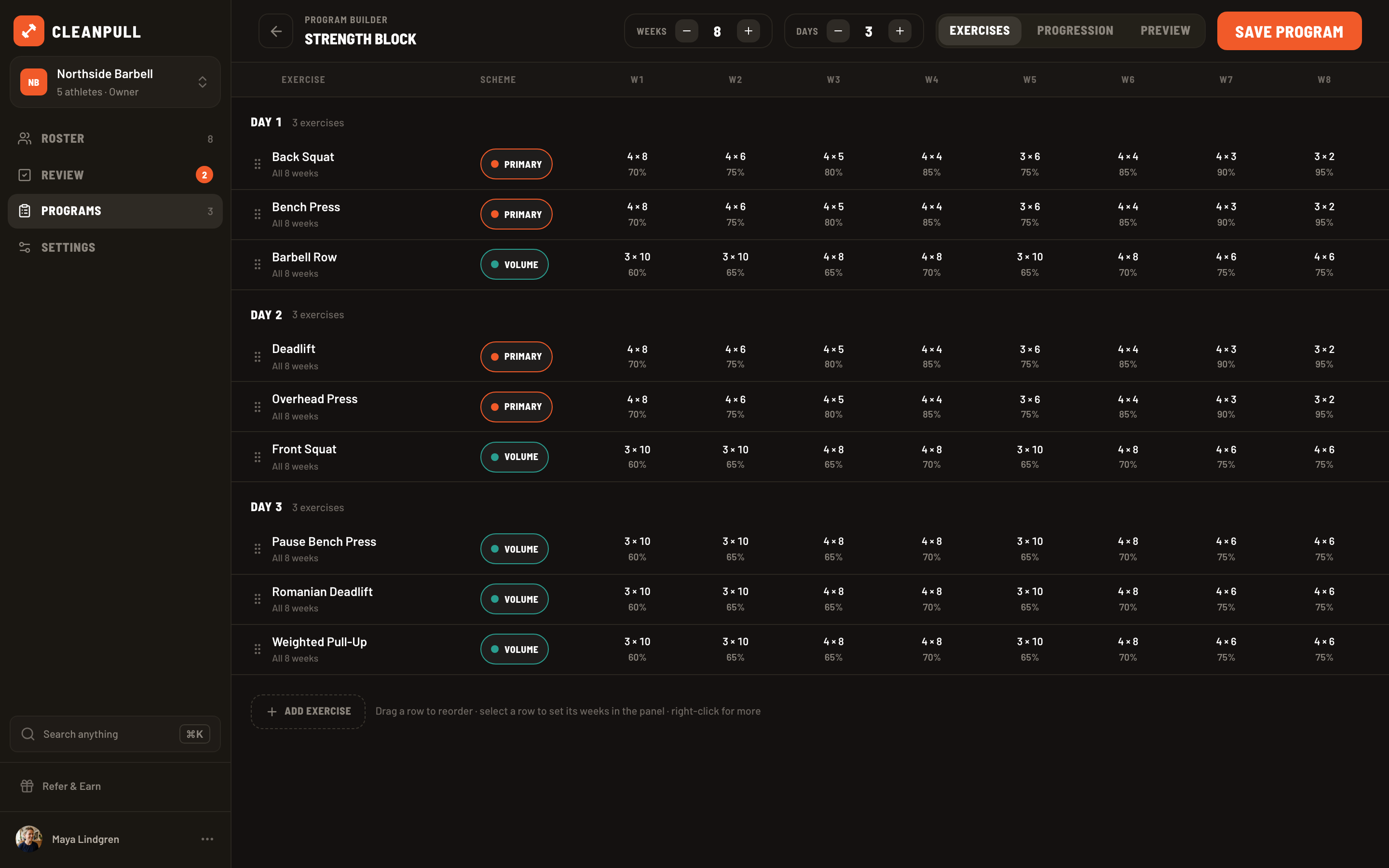
Section titled “Preview and edit the program”Use the whole-program preview to check exercise order, week ranges, schemes, sets, reps, and intensity before saving. On the web, ⌘Z undoes the last edit and ⇧⌘Z redoes it (Ctrl on Windows); the header has matching Undo and Redo buttons.
On a long program, use the web builder’s Filter menus to show one progression scheme, one exercise, or both across every day at once. Days with no matching exercises stay visible. The Preview uses the same filter. While a filter is on, move exercises by right-clicking a row and choosing Move to day N. Dragging is disabled. Adding an exercise clears the filter. Press × to see everything again.
Change one exercise’s progression
Section titled “Change one exercise’s progression”A custom value changes one exercise without changing the rest of its scheme. For example, you can give Deadlift fewer sets than the other Primary lifts, or use a lower percentage for a difficult variation.
Choose the pencil on an exercise to open Progression, select intensity, reps, or sets, then choose a week and enter the new value. A teal dot marks each custom value. Reset removes the exercise’s custom values and makes it follow the scheme again.
If several exercises need the same changes, give them their own scheme.
Choose where the load comes from
Section titled “Choose where the load comes from”For exercises such as back extensions, dumbbell accessories, or planks, you may want to set the weight or hold time directly, or let the athlete choose. Open Load on the phone, or find Load comes from in the exercise panel on the web:
- % of max is the default. Each week’s weight is the athlete’s target × that week’s percentage.
- Weight (or Duration for a timed hold) lets you enter a weight or hold time for each week in Progression. Weights move in the exercise’s load step; holds move in 5-second steps. A week you leave empty uses the athlete’s target × that week’s percentage instead.
- Athlete lets the athlete choose the weight. The workout starts with what they used last time. You can add a target RPE to guide their effort.
In Projected loads, a dotted underline marks a weight written into the program. In previews and in the web builder’s grid, a dash marks a weight left to the athlete. Exercises with a weight or duration set for every week, and those set to Athlete, do not ask for a target when you assign the program.
For more on using another lift’s max, bodyweight, RPE, or timed holds, read Intensity targets and timed holds.
Assign the program
Section titled “Assign the program”After saving, choose Assign to athlete from the confirmation or from the program’s menu.
- Select an athlete who is waiting for a program.
- Review the target maxes. Cleanpull fills them in from any targets set in the program for that athlete, or else from their tracked, manual, or estimated 1-rep maxes.
- Edit a target, clear it to let the athlete choose their weight, or copy it to other slots for the same lift.
- Set the hold-duration targets for timed exercises.
- Set the athlete’s current week and day if they are not starting at week 1, day 1.
- Preview the prescription and choose Assign.
Each athlete has their own targets, so two athletes can follow the same program with different weights. Targets are optional. Without one, the athlete enters their own weight, and you can use an RPE target to guide their effort.
The Targets screen leaves out exercises with a weight or duration set for every week, and those where the athlete chooses the weight. A note counts these exercises.
Preview the athlete’s workout
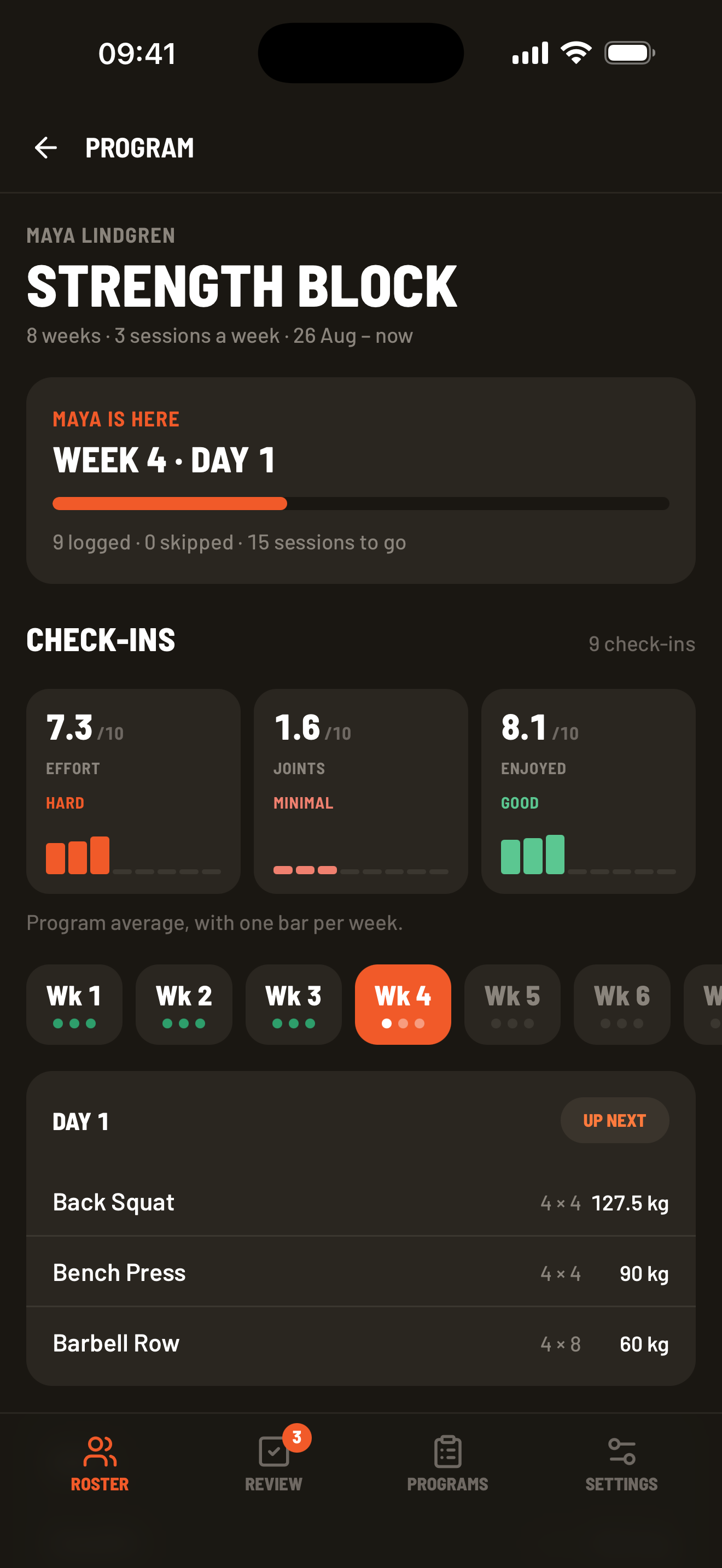
Section titled “Preview the athlete’s workout”On the web, you can try a workout in a phone preview to see what the athlete will see on their Train screen. Start the workout, change reps and weights, log sets, skip an exercise, and finish. Nothing is saved: the athlete’s workouts, progress and targets stay as they were, and closing the preview throws away what you logged.
- For an athlete with a program, open Roster → athlete → Program. Preview next workout opens the workout they are on. Each day card has a Preview button for that day in the week you picked.
- For a program you are building, open its Preview tab, pick a member, and choose Preview on a day card. The preview uses that athlete’s targets and includes your unsaved changes.
The arrows beside the phone move to the previous or next workout in the program. So do the [ and ] keys. A day with nothing programmed shows as a rest day. Esc closes the preview.
The preview uses default rest times and starting weights. Rest runs for 3 minutes unless the program sets one, and an exercise without a target starts from the empty bar. In the builder, the phone shows the whole day even when a filter is on. While an athlete is in the middle of a workout, Preview next workout is unavailable until they finish. You can still preview workouts from the day cards.
Change, duplicate, or archive a program
Section titled “Change, duplicate, or archive a program”- To move an athlete to a different program, open Roster → athlete → Program → Change program.
- To keep a program at the top of the Programs list, open its menu and choose Pin to top. Pins are personal to each coach. Choose Unpin to put the program back in last-updated order.
- To reuse a program while preserving the original, open its menu and choose Duplicate. See below.
- To remove a program from the active Programs list, choose Archive. Existing assignments keep their program.
Duplicate a program
Section titled “Duplicate a program”A duplicate is a copy of the program that can take some of its athletes with it. Use it to customize a program for one or a few athletes while everyone else stays on the original.
- Open the program’s menu and choose Duplicate.
- Check the athletes to move. Each one keeps their current week on the copy. Leave everyone unchecked to copy without moving anyone.
- Change the suggested name if you want, then confirm.
The copy opens in the builder, and the moved athletes see the new program name on their Train tab. Their workout history stays with the original program. To reverse a move, open Roster → athlete → Program → Change program and pick the original.
An athlete who is in the middle of a workout is greyed out and cannot be moved. Ask them to finish or skip it first.
If you edit a program that athletes are using, workouts already started keep their original sets, reps, weights, and rest settings. Later workouts use the updated program and the athlete’s current targets.